
Creating Posts
There will often be multiple unique post types on any given site but the process for creating and editing them is always the same.
Click on the post type you would like to publish by selecting it in the sidebar nav in the WordPress backend. From here you will see a list of all the posts that exist on the site currently organized by publish date. Click the Add New button in the top right to create a new post. This will take you to a new page with blank fields which you can use to add information and images to your post.
Post Statuses
- Published: Standard live post status
- Draft: In progress post (hidden from search engines and not visible to visitors).
- Pending: Similar to draft waiting on approval to publish.
- Private: Hidden from search/normal visitors. Users that are signed into an account on your site will be able to view this post.
- Password Protected: Here you can set a manual password for this post. Visitors will be prompted to enter the password before the page content will be visible.
While creating the post it will remain in ‘Draft’ mode until you click the blue publish button in the top right of the page. If you aren’t able to finish writing a post in a single sitting you can instead save the post as a draft and return to it later. As long as a post is in ‘Draft’ mode it won’t be visible to visitors of the site until it is published (You can also use mark an existing post as a draft to temporarily remove it from the front end of the website, until it is re-published).
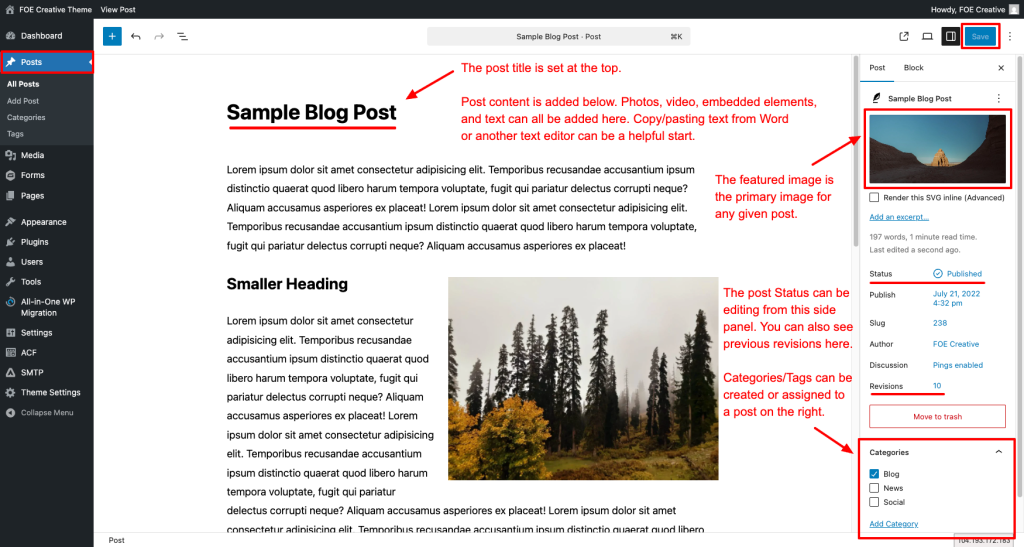
Post Elements
- Post Title: the post title is set at the top of the page.
- Post Content: is added below. Photots, videos, embedded elements, and text can all be added here. Copy/pasting text from Word can be a helpful starting point. Typing [/block title] will allow you to add blocks here.
- Featured Image: added in the right panel. This is the primary image for the post, will display on a any list view and when the post is shared on social media.
- Categories & Tags: Used for post organization and to group similar post together.
Outside of simply adding text into the main post content area custom blocks can also be added in this area used the [+] icon in the top left.
Custom Post Types
Custom post types are used for repeating content that each have unique URLs on your site. For example a portfolio of work, products, team members, or articles. Each of these will be listed in the left sidebar in the backend of WordPress. Each of these post types are separate from one another. Often they will have unique fields that only display for the specific post type (Including custom taxonomies/categories).