
SEO Best Practices
This guide covers the essentials for creating and refreshing blog content that ranks well and engages readers. Use it as a checklist when writing new posts or updating existing content.
Post Structure
- H1: One per post — your post title. Include the primary keyword naturally.
- H2s: Use for major sections (aim for 2-5 per post depending on length). Only use one per post.
- H3s: Use for subsections under H2s. Keep hierarchy logical — never skip each level.
- Paragraphs: Keep them short (2-4 sentences). Large blocks of text hurt readability.
- Introduction: Hook readers in the first 100 words. State what they’ll learn.
- Conclusion: Summarize key points and include a clear call-to-action.
Tip: Front-load value. Put your most important information early — many readers end up skimming content.
Keyword Placement
| Location | Guidance |
| Post Title (H1) | Include primary keyword, ideally near the beginning |
| Meta Title | 50-60 characters. Primary keyword + compelling hook |
| Meta Description | 150-160 characters. Include keyword, summarize value |
| URL Slug | Short, lowercase, hyphens only. Include keyword (e.g., /memory-care-tips) |
| First 100 Words | Use primary keyword naturally in opening paragraph |
| Subheadings (H2/H3) | Include keyword variations where natural — but don’t force it |
| Image Alt Text | Describe the image; include keyword only if genuinely relevant |
Tip: Aim for a Rank Math score of 80+, but prioritize readability over hitting the indicator. You will need to enter focus keywords to get accurate scoring.
Rich Content Elements
Posts with varied content types perform better in search and keep readers engaged longer:
- Images: At least 1-2 relevant images per post. Always include descriptive alt text.
- Lists: Break up complex information with bullet points or numbered lists.
- Tables: Use for comparisons, schedules, or data that’s easier to scan than read.
- Pull quotes: Highlight key statistics or memorable phrases.
- Internal links: Link to 2-3 relevant pages (services, other posts, contact).
- External links: Link to authoritative and credible sources when citing statistics or research.
FAQ Sections
Adding a brief FAQ section (3-5 questions) at the end of posts can help with:
- Featured snippets — Google often pulls FAQ content for position zero
- Voice search — conversational questions match how people ask assistants
- Schema eligibility — FAQ markup can generate rich results in search
Internal Linking
- Every post should link to at least 2 relevant Optima Living pages
- Always include a link to the Contact page or a relevant CTA
- Use descriptive anchor text — avoid “click here”
- When refreshing old posts, add links to newer relevant content
Image Best Practices
- File names: Use descriptive names before upload (senior-yoga-class.jpg, not IMG_2847.jpg)
- Alt text: Describe what’s in the image in 125 characters or fewer – don’t keyword stuff
- Compression: Compress images before upload — aim for under 200KB per image
- Format: Use WebP when possible, otherwise JPEG for photos, PNG for graphics
- Dimensions: Upload at the size needed (1920px by 1080px for the featured image. ~1024px wide for inline images).
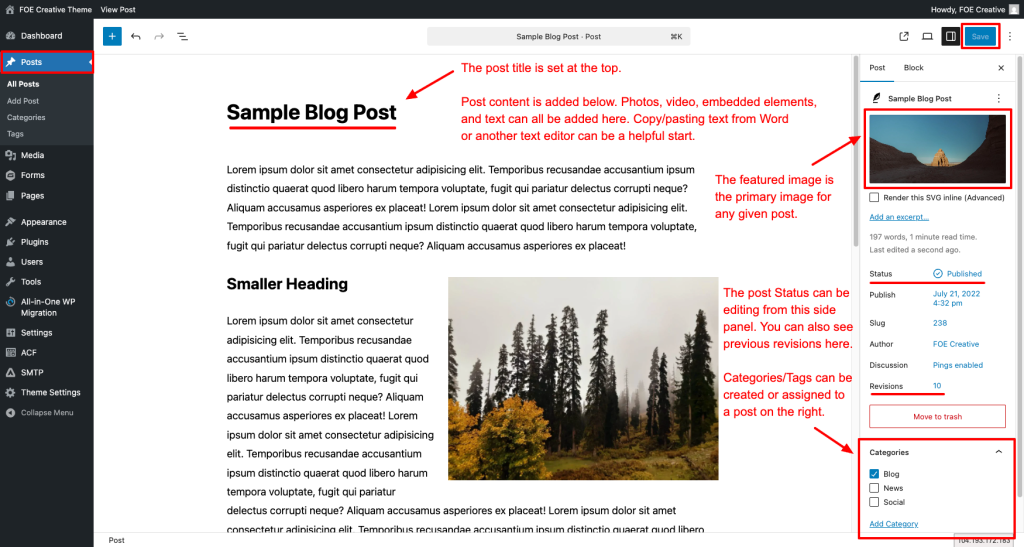
- Featured image: Every post needs one. It appears in social shares and post listings.
Refreshing Existing Posts
When updating older blog content, focus on these areas:
- Update outdated information: Statistics, dates, references to “this year,” or verbiage like “in the last five years,” etc.
- Improve metadata: Rewrite title/description if they’re weak or not relevant
- Add internal links: Link to newer content published since the original post
- Update post-date with refresh date
- Expand thin sections: Add depth where content feels light or incomplete
- Add rich elements: Images, FAQs, tables — if the post lacks visual variety
- Check/fix broken links: Remove or replace any links that no longer work
Tip: Refreshing 2-3 older posts per month often drives more traffic than publishing new content. This is how Search Engines and AI Overviews crawl and index pages on the site.
Pre-Publish Checklist
- Primary keyword in title, URL, meta description, and first 100 words
- Meta title under 60 characters, meta description under 160
- One H1 only; logical H2/H3 hierarchy throughout
- At least 2 internal links to relevant service pages
- All images have descriptive alt text
- Featured image set
- Aim for a Rank Math SEO score of 80+ (or all critical items green)
- Clear call-to-action in conclusion
- Post categorized and tagged appropriately