
Managing Users
When a site is launched, we will create an Administrator account for you and provide the login link and credentials to access your new site.
However, additional accounts may be needed for other team members to create, edit, and publish content – or – a forgotten password may need to be reset. Let’s start with creating a new user, using an existing Administrator account.
Creating a New User
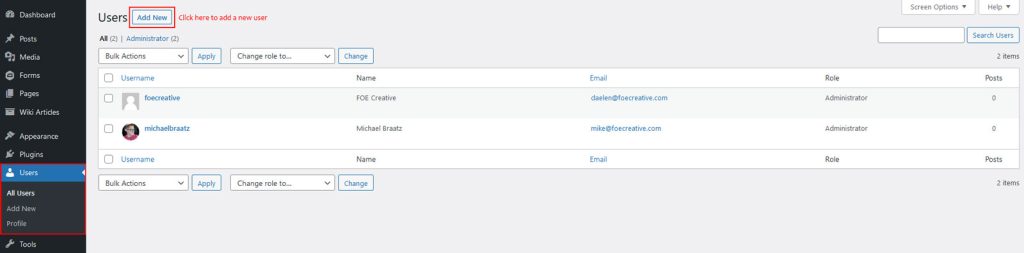
Once logged in to the WordPress Backend, navigate to the ‘Users’ section on the left-hand sidebar. Once there, click the button in the top left corner labeled ‘Add New’.
Enter a Username, Email Address, First and Last Name. Unless necessary, the Language should be left to Site Default. We recommend using a generated password for new accounts, otherwise, stick to unique passwords with a mixture of letters, numbers, and special characters for maximum security.
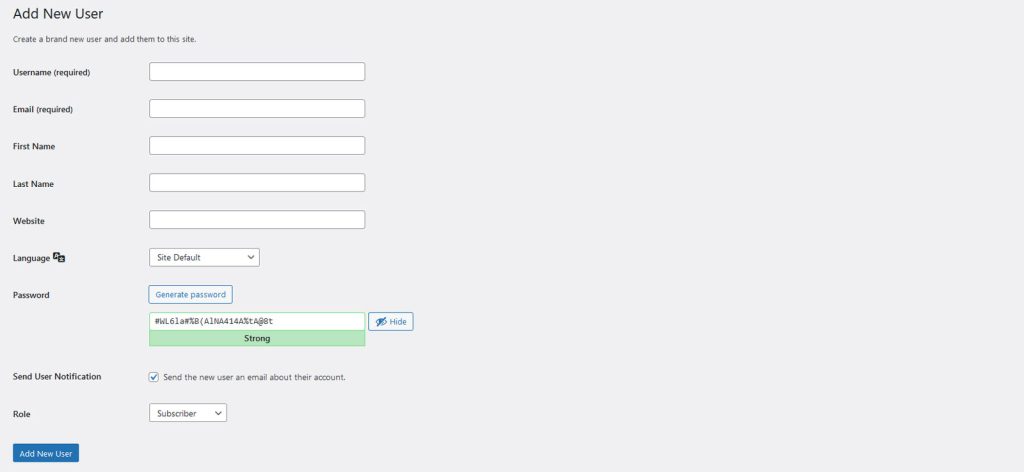
Note: The username can never be changed, so choose carefully!
The Role that you select will depend on what you want the new user to be able to do. Here is a breakdown on roles:
- Administrator – Has access to all the administration features within the site.
- Editor – Can publish and manage posts including the posts of other users.
- Author – Can publish and manage their own posts.
- Contributor – Can write and manage their own posts but cannot publish them.
- Subscriber – Can only manage their profile.
Edit an Existing User or Reset Password
You can also edit an existing user here. Administrator accounts will have the ability to reset passwords for other users. Or even deleted accounts for users that are no longer necessary.
Advanced permissions and custom users roles can be created to meet your specific needs. Please reach out to dev@foecreative.com if you need a new user role/permissions set configured for your site.